> ## Documentation Index
> Fetch the complete documentation index at: https://docs-dev-update-anonymous-sessons-ea.mintlify.site/llms.txt
> Use this file to discover all available pages before exploring further.

> 動的変数を使用して、ローカライズされたUniversal Loginのサインアップおよびログインプロンプトをレンダリングする方法を学びます。

# 動的変数を使用してカスタムフォーム要素を多言語対応にする

コンテキストデータに応じて、[サインアッププロンプトのカスタマイズ](/docs/ja-jp/customize/login-pages/universal-login/customize-signup-and-login-prompts)を異なる形でレンダリングできます。`locale` 変数を使うことで、フォーム入力を条件付きでレンダリングし、バリデーションの動作を定義できます。

次のユースケースでは、`locale` 変数を使用して、Terms of Service のメッセージとチェックボックスをレンダリングします。[ページテンプレート](/docs/ja-jp/customize/login-pages/universal-login/customize-templates#available-variables)で公開されている任意の変数に置き換えることができます。

<h3 id="prerequisites">
  前提条件
</h3>

* テナントで[カスタムドメイン](/docs/ja-jp/customize/custom-domains)が検証済みである
* テナントにページテンプレートが設定されている

<h3 id="enable-fr-and-es-locales">
  fr と es のロケールを有効にする
</h3>

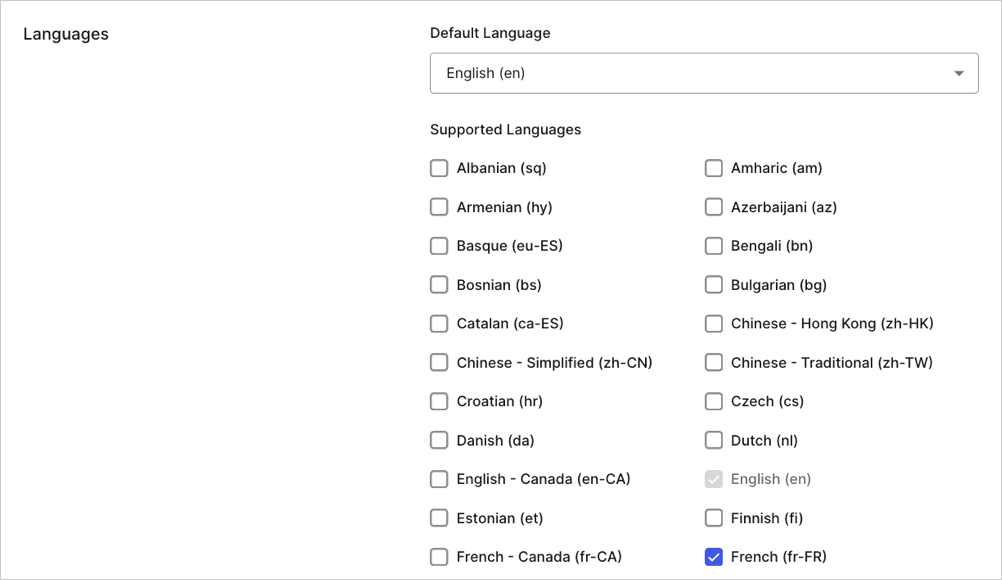
<Tooltip tip="Auth0 Dashboard: サービスを設定するための Auth0 の主要な製品。" cta="用語集を見る" href="/docs/ja-jp/glossary?term=Auth0+Dashboard">Auth0 Dashboard</Tooltip> に移動し、Settings > General を開いて、ロケールを有効にします。
<Frame>
  <img src="https://mintcdn.com/docs-dev-update-anonymous-sessons-ea/gaGY78MREKo0SjhU/docs/images/cdy7uua7fh8z/4yCGYTZ3RDyeULWIFcyHSv/01ce1985b1f8655aff0a0a2b4db6bee0/Language_Picker_-_EN.png?fit=max&auto=format&n=gaGY78MREKo0SjhU&q=85&s=374f101c9cc414f2713a963026b85bd0" alt="" width="1002" height="580" data-path="docs/images/cdy7uua7fh8z/4yCGYTZ3RDyeULWIFcyHSv/01ce1985b1f8655aff0a0a2b4db6bee0/Language_Picker_-_EN.png" />
</Frame>

<h3 id="conditionally-render-custom-fields">
  Custom Fields を条件付きでレンダリングする
</h3>

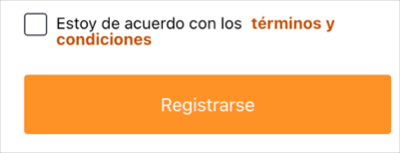
<Tooltip tip="Management API: お客様が管理タスクを実行できるようにする製品。" cta="用語集を見る" href="/docs/ja-jp/glossary?term=Management+API">Management API</Tooltip> を使用して、`form-content-end` のサインアッププロンプトにある <Tooltip tip="Universal Login: ユーザーのアイデンティティを確認するために、アプリケーションは Auth0 の認可サーバーでホストされる Universal Login にリダイレクトされます。" cta="用語集を見る" href="/docs/ja-jp/glossary?term=Universal+Login">Universal Login</Tooltip> Prompt コンテナーに template partial を追加します。locale が `es` または `fr` の場合は、Terms of Service のメッセージとチェックボックスをレンダリングするとよいでしょう。

```liquid lines theme={null}
{% if locale == 'fr' %}
  <div class="ulp-field">
    <input
      type="checkbox"
      name="ulp-terms-of-service"
      id="terms-of-service">
    <label for="terms-of-service">
      J'accepte les
      <a href="https://fr.example.com/tos">termes et conditions</a>
    </label>
  </div>
{% endif %}
{% if locale == 'es' %}
  <div class="ulp-field">
    <input
      type="checkbox"
      name="ulp-terms-of-service"
      id="terms-of-service">
    <label for="terms-of-service">
      Estoy de acuerdo con los
      <a href="https://es.example.com/tos">términos y condiciones</a>
    </label>
  </div>
{% endif %}
```

次のリクエストは、[Management API](https://auth0.com/docs/api/management/v2/prompts/put-custom-text-by-language)の**特定のプロンプトにカスタムテキストを設定する**エンドポイントに送信されます。

```javascript lines theme={null}
// PUT prompts/signup/partials

{
  "signup": {
    "form-content-end": "{% if locale..."
  }
}
```

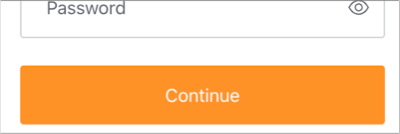
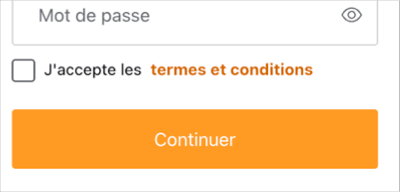
サインアッププロンプトでは、ロケールが`fr`または`es`に設定されている場合にのみ、ToSメッセージとチェックボックスが表示されるようになりました。
<Frame>
  <img src="https://mintcdn.com/docs-dev-update-anonymous-sessons-ea/j0Y953XB3sFj6qnF/docs/images/cdy7uua7fh8z/3zBadIHnkl9bIWP9BH1lLj/b2a6d9932be3bbb150b4dbbf76bc6599/2024-01-31_16-17-04.png?fit=max&auto=format&n=j0Y953XB3sFj6qnF&q=85&s=a60a68d63e1b0766a3ccf2a53a9c8e23" alt="" width="400" height="192" data-path="docs/images/cdy7uua7fh8z/3zBadIHnkl9bIWP9BH1lLj/b2a6d9932be3bbb150b4dbbf76bc6599/2024-01-31_16-17-04.png" />
</Frame>

<Frame>
  <img src="https://mintcdn.com/docs-dev-update-anonymous-sessons-ea/j0Y953XB3sFj6qnF/docs/images/cdy7uua7fh8z/3rwVd1h1Av7QzOEEWoCHhF/519a2eb5ac99c3801861c3372b81c0b9/2024-01-31_16-17-16.png?fit=max&auto=format&n=j0Y953XB3sFj6qnF&q=85&s=89384942625e5fa3d69f39960ce4546a" alt="" width="400" height="153" data-path="docs/images/cdy7uua7fh8z/3rwVd1h1Av7QzOEEWoCHhF/519a2eb5ac99c3801861c3372b81c0b9/2024-01-31_16-17-16.png" />
</Frame>

<Frame>
  <img src="https://mintcdn.com/docs-dev-update-anonymous-sessons-ea/itgJjKWPZWQ8PNK-/docs/images/cdy7uua7fh8z/2qYzAI6QVBLmqCW2FTAiGj/f19c59d79c67c63782b70995dbd223c3/2024-01-31_16-17-24.png?fit=max&auto=format&n=itgJjKWPZWQ8PNK-&q=85&s=69180c1f7eab00465a0dc17326183787" alt="" width="400" height="134" data-path="docs/images/cdy7uua7fh8z/2qYzAI6QVBLmqCW2FTAiGj/f19c59d79c67c63782b70995dbd223c3/2024-01-31_16-17-24.png" />
</Frame>

表示をテストするには、**Manage Dashboard** に移動し、[Branding > Universal Login > Customization Options](https://manage.auth0.com/dashboard/us/dev-6endizjt/universal-login/customizations/colors) に進みます。次に、**「試す」ボタン** を右クリックしてリンク先のアドレスをコピーします。コピーしたURLに次のクエリパラメータを追加し、新しいURLに移動します: `&screen_hint=signup&ui_locales=fr` (または `es`) 。

<h3 id="add-validation">
  バリデーションを追加
</h3>

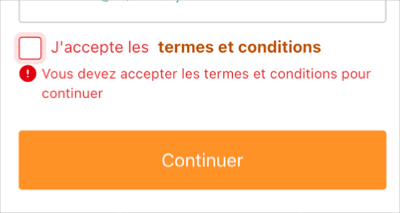
ロケールが `fr,` の場合は、続行する前にチェックボックスが選択されていることをバリデーションできます。次のバリデーションコードを使って、template partial を更新します。

```liquid lines expandable theme={null}
{% if locale == 'fr' %}
  <div class="ulp-field">
    <input
      type="checkbox"
      name="ulp-terms-of-service"
      id="terms-of-service">
    <label for="terms-of-service">
      J'accepte les
      <a href="https://fr.example.com/tos">termes et conditions</a>
    </label>

    <!-- 新規 -->
    <div
      class="ulp-error-info"
      data-ulp-validation-function="requiredFunction"
      data-ulp-validation-event-listeners="change">
      Vous devez accepter les termes et conditions pour continuer
    </div>
    <!-- 新規ここまで -->
  </div>
{% endif %}
{% if locale == 'es' %}
  <div class="ulp-field">
    <input
      type="checkbox"
      name="ulp-terms-of-service"
      id="terms-of-service">
    <label for="terms-of-service">
      Estoy de acuerdo con los
      <a href="https://es.example.com/tos">términos y condiciones</a>
    </label>
  </div>
{% endif %}

<!-- 新規 -->
<script>
  function requiredFunction(element, formSubmitted) {
    if (! formSubmitted) {
      return true;
    }
    return element.checked;
  }
</script>
<!-- 新規ここまで -->
```

このバリデーションを適用すると、ToS への同意が必要になるのは `fr` ロケールのユーザーだけです。
<Frame>
  <img src="https://mintcdn.com/docs-dev-update-anonymous-sessons-ea/RdbJJNqsNn9HyXNH/docs/images/cdy7uua7fh8z/7jBPuIe62PDNiIPUYzVVix/74de519659de4a8b4329165e799b1815/2024-01-31_16-20-54.png?fit=max&auto=format&n=RdbJJNqsNn9HyXNH&q=85&s=3c0eaa716984588d2f0303ae32710b23" alt="" width="400" height="213" data-path="docs/images/cdy7uua7fh8z/7jBPuIe62PDNiIPUYzVVix/74de519659de4a8b4329165e799b1815/2024-01-31_16-20-54.png" />
</Frame>

<Callout icon="file-lines" color="#0EA5E9" iconType="regular">
  このユースケースのバリデーションはクライアントサイドで行われ、ユーザーの利便性を高めるためのものです。必ず実行されるとは限りません。たとえば、ユーザーのブラウザーで Javascript が無効になっている場合があります。さらに、バリデーションは好奇心からでも悪意をもってでも改変される可能性があります。バリデーションロジックの完全性を確保するには、クライアントサイドのバリデーションをサーバーサイドのバリデーションと組み合わせる必要があります。
</Callout>