> ## Documentation Index
> Fetch the complete documentation index at: https://docs-dev-update-anonymous-sessons-ea.mintlify.site/llms.txt
> Use this file to discover all available pages before exploring further.

> Learn how to configure an update policy form using Forms for Actions for users to review and accept new terms of service or consent updates.

# Use Cases: Configure an update policy form using Forms

<Card title="Before you start">
  1. Create a [Machine-to-Machine Application](/docs/get-started/auth0-overview/create-applications/machine-to-machine-apps) with the following scopes enabled:

  * `read:users`
  * `update:users`
  * `create:users`
  * `read:users_app_metadata`
  * `update:users_app_metadata`
  * `create:users_app_metadata`

  2. Add a [Vault connection](/docs/customize/forms/vault) using the M2M application credentials.
</Card>

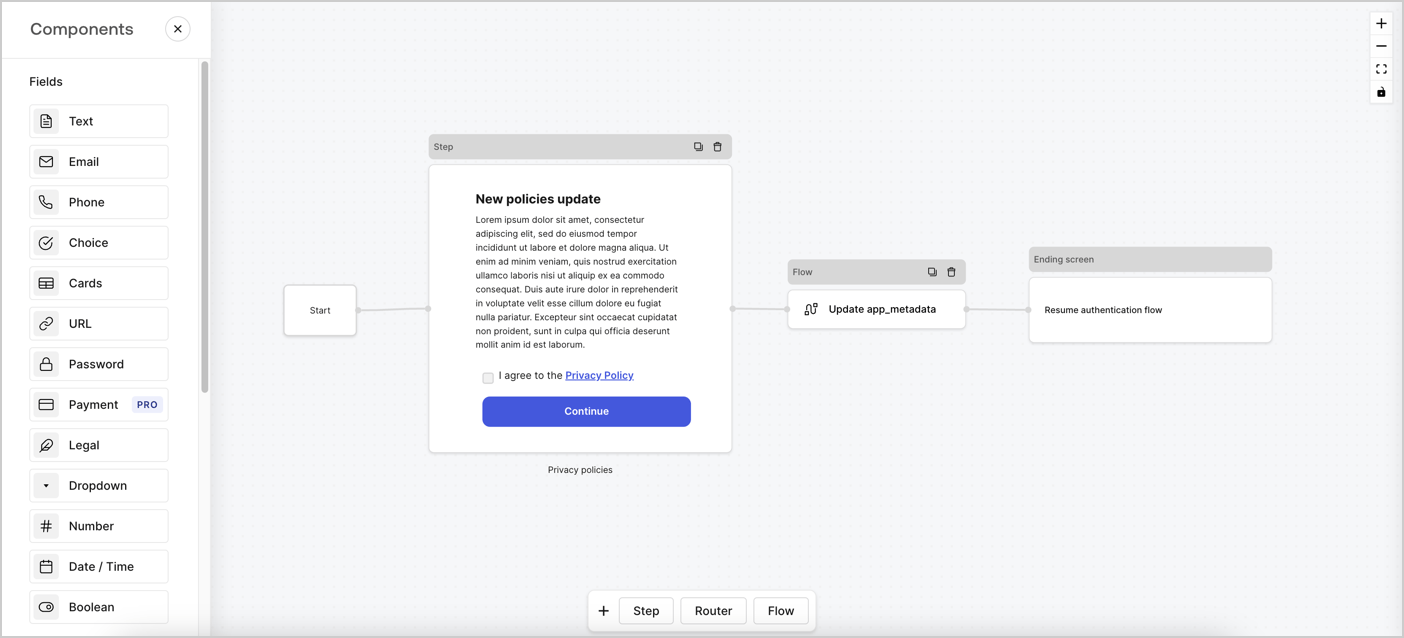
Forms for Actions allows you to create custom privacy policies flows and store the consent under the `app_metadata` object.
<Frame>
  <img src="https://mintcdn.com/docs-dev-update-anonymous-sessons-ea/G1d5Sm0ol-yfoOMd/docs/images/cdy7uua7fh8z/6i68dMvHDTijfRmSgN1x8Q/ad900e7d4c0fb34645921435472b8684/privavy-policy-form.png?fit=max&auto=format&n=G1d5Sm0ol-yfoOMd&q=85&s=ebdb70ae1ae717b53a44e5c3d0806f30" alt="Dashboard > Actions > Forms > Privacy policy use case" data-og-width="1404" width="1404" data-og-height="638" height="638" data-path="docs/images/cdy7uua7fh8z/6i68dMvHDTijfRmSgN1x8Q/ad900e7d4c0fb34645921435472b8684/privavy-policy-form.png" data-optimize="true" data-opv="3" srcset="https://mintcdn.com/docs-dev-update-anonymous-sessons-ea/G1d5Sm0ol-yfoOMd/docs/images/cdy7uua7fh8z/6i68dMvHDTijfRmSgN1x8Q/ad900e7d4c0fb34645921435472b8684/privavy-policy-form.png?w=280&fit=max&auto=format&n=G1d5Sm0ol-yfoOMd&q=85&s=1e5a52f19194aeb8a29f9d8ed7708aff 280w, https://mintcdn.com/docs-dev-update-anonymous-sessons-ea/G1d5Sm0ol-yfoOMd/docs/images/cdy7uua7fh8z/6i68dMvHDTijfRmSgN1x8Q/ad900e7d4c0fb34645921435472b8684/privavy-policy-form.png?w=560&fit=max&auto=format&n=G1d5Sm0ol-yfoOMd&q=85&s=a222ff26c096d22fa7211139a0dbcf37 560w, https://mintcdn.com/docs-dev-update-anonymous-sessons-ea/G1d5Sm0ol-yfoOMd/docs/images/cdy7uua7fh8z/6i68dMvHDTijfRmSgN1x8Q/ad900e7d4c0fb34645921435472b8684/privavy-policy-form.png?w=840&fit=max&auto=format&n=G1d5Sm0ol-yfoOMd&q=85&s=fafa17eb4e0a08f3750daa9642a841e7 840w, https://mintcdn.com/docs-dev-update-anonymous-sessons-ea/G1d5Sm0ol-yfoOMd/docs/images/cdy7uua7fh8z/6i68dMvHDTijfRmSgN1x8Q/ad900e7d4c0fb34645921435472b8684/privavy-policy-form.png?w=1100&fit=max&auto=format&n=G1d5Sm0ol-yfoOMd&q=85&s=00455e39b66893a147a8b7d348ada334 1100w, https://mintcdn.com/docs-dev-update-anonymous-sessons-ea/G1d5Sm0ol-yfoOMd/docs/images/cdy7uua7fh8z/6i68dMvHDTijfRmSgN1x8Q/ad900e7d4c0fb34645921435472b8684/privavy-policy-form.png?w=1650&fit=max&auto=format&n=G1d5Sm0ol-yfoOMd&q=85&s=4b7eb7e9a0c3732f4e7f9aed50fd67d8 1650w, https://mintcdn.com/docs-dev-update-anonymous-sessons-ea/G1d5Sm0ol-yfoOMd/docs/images/cdy7uua7fh8z/6i68dMvHDTijfRmSgN1x8Q/ad900e7d4c0fb34645921435472b8684/privavy-policy-form.png?w=2500&fit=max&auto=format&n=G1d5Sm0ol-yfoOMd&q=85&s=dadf3365bde64084357f2d84ff7e3b4d 2500w" />
</Frame>

The sections below outline how you can create an Update Policy form using nodes and flows, along with steps for adding your form to a [Post Login](/docs/customize/actions/explore-triggers/signup-and-login-triggers/login-trigger) Action.

## Create a form from scratch

Follow these steps to create a form to gather information:

1. Open the Form editor by selecting **Auth0 Dashboard > Actions > Forms.**
2. Select **Create Form** > **Start from scratch**.

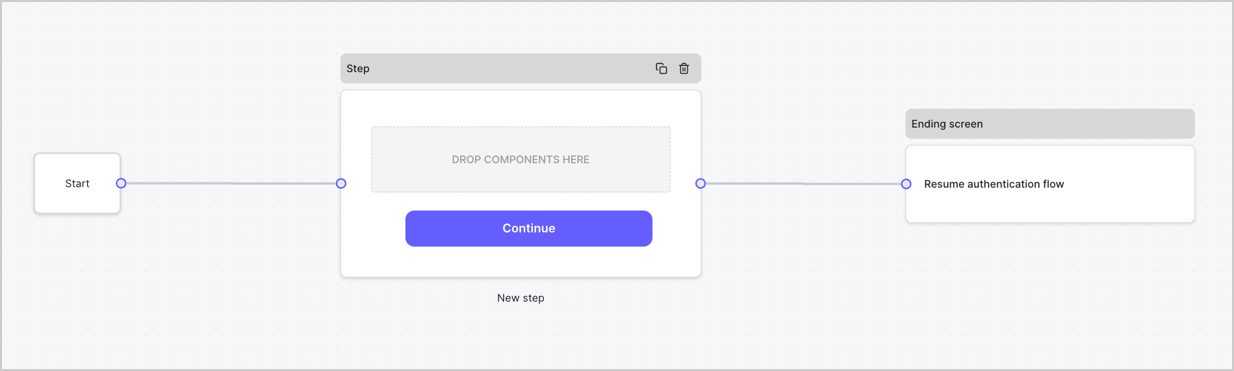
By default, a new form contains a Start node, a Step node, and an Ending screen node.
<Frame>
  <img src="https://mintcdn.com/docs-dev-update-anonymous-sessons-ea/itgJjKWPZWQ8PNK-/docs/images/cdy7uua7fh8z/2TZ9jSjgEcARFpULI6hz4R/a4319a1bd482f2ee5cc23100fdb2f42c/New-form-Forms-for-action-use-case.png?fit=max&auto=format&n=itgJjKWPZWQ8PNK-&q=85&s=aa48f96279cc4ec7f9a33bc9c44a260b" alt="Dashboard > Forms > Use Cases > Form" data-og-width="1234" width="1234" data-og-height="371" height="371" data-path="docs/images/cdy7uua7fh8z/2TZ9jSjgEcARFpULI6hz4R/a4319a1bd482f2ee5cc23100fdb2f42c/New-form-Forms-for-action-use-case.png" data-optimize="true" data-opv="3" srcset="https://mintcdn.com/docs-dev-update-anonymous-sessons-ea/itgJjKWPZWQ8PNK-/docs/images/cdy7uua7fh8z/2TZ9jSjgEcARFpULI6hz4R/a4319a1bd482f2ee5cc23100fdb2f42c/New-form-Forms-for-action-use-case.png?w=280&fit=max&auto=format&n=itgJjKWPZWQ8PNK-&q=85&s=1a1720bcaa7c7a53cc86adc03355f588 280w, https://mintcdn.com/docs-dev-update-anonymous-sessons-ea/itgJjKWPZWQ8PNK-/docs/images/cdy7uua7fh8z/2TZ9jSjgEcARFpULI6hz4R/a4319a1bd482f2ee5cc23100fdb2f42c/New-form-Forms-for-action-use-case.png?w=560&fit=max&auto=format&n=itgJjKWPZWQ8PNK-&q=85&s=ab6dd387a5962dcfb4e5d8ba0529ebcd 560w, https://mintcdn.com/docs-dev-update-anonymous-sessons-ea/itgJjKWPZWQ8PNK-/docs/images/cdy7uua7fh8z/2TZ9jSjgEcARFpULI6hz4R/a4319a1bd482f2ee5cc23100fdb2f42c/New-form-Forms-for-action-use-case.png?w=840&fit=max&auto=format&n=itgJjKWPZWQ8PNK-&q=85&s=90bfa4649e4a7503319aa7d6f7c6af55 840w, https://mintcdn.com/docs-dev-update-anonymous-sessons-ea/itgJjKWPZWQ8PNK-/docs/images/cdy7uua7fh8z/2TZ9jSjgEcARFpULI6hz4R/a4319a1bd482f2ee5cc23100fdb2f42c/New-form-Forms-for-action-use-case.png?w=1100&fit=max&auto=format&n=itgJjKWPZWQ8PNK-&q=85&s=f4d2da718e5acf8727c23a45933a52a5 1100w, https://mintcdn.com/docs-dev-update-anonymous-sessons-ea/itgJjKWPZWQ8PNK-/docs/images/cdy7uua7fh8z/2TZ9jSjgEcARFpULI6hz4R/a4319a1bd482f2ee5cc23100fdb2f42c/New-form-Forms-for-action-use-case.png?w=1650&fit=max&auto=format&n=itgJjKWPZWQ8PNK-&q=85&s=bfe71806b7697096fce1b1d9cf9ff1d6 1650w, https://mintcdn.com/docs-dev-update-anonymous-sessons-ea/itgJjKWPZWQ8PNK-/docs/images/cdy7uua7fh8z/2TZ9jSjgEcARFpULI6hz4R/a4319a1bd482f2ee5cc23100fdb2f42c/New-form-Forms-for-action-use-case.png?w=2500&fit=max&auto=format&n=itgJjKWPZWQ8PNK-&q=85&s=1c7d4556d2bc9eb1e6dc2e6b59d661bb 2500w" />
</Frame>

### Configure the Step node

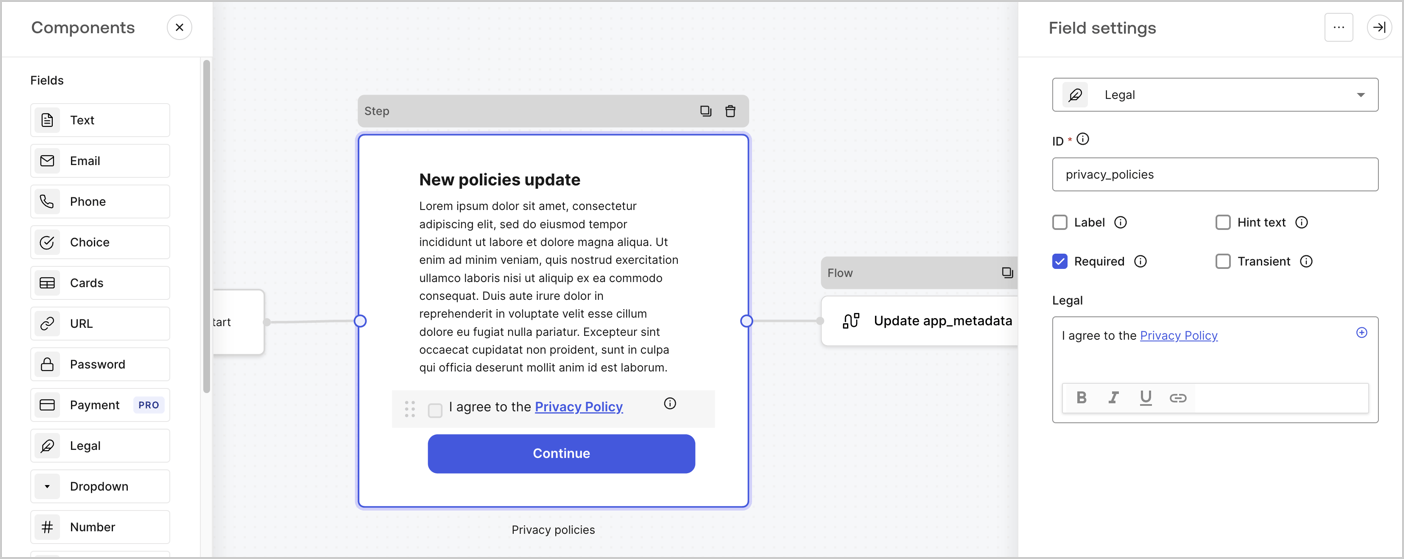
The Step node is the graphical interface visible to users. Add [Fields](/docs/customize/forms/nodes-and-components) to the Step node to collect the new agreement acceptance value by following these steps:

1. Drag a **Rich text** field from the **Components menu** into the **Step** node.

   * **Rich text**: Enter a description of your privacy policies updates.
   * Select **Save**.
2. Drag a **Legal** field into the **Step** node.

   * **ID**: Enter `privacy_policies`.
   * **Required**: Enable the checkbox.
   * **Legal**: Enter `I agree to the Privacy Policy`.
   * Select **Save**.
3. Select **Publish** to save.
<Frame>
  <img src="https://mintcdn.com/docs-dev-update-anonymous-sessons-ea/gaGY78MREKo0SjhU/docs/images/cdy7uua7fh8z/59zFFjQjAnjogkc2QGIqqJ/0ad66b1b636544122aa4e65968b76c2c/privacy-policy-step-node.png?fit=max&auto=format&n=gaGY78MREKo0SjhU&q=85&s=293ad3bd03e02f8cd2f30595c05af63d" alt="Dashboard > Actions > Forms > Use case privacy policy step node" data-og-width="1404" width="1404" data-og-height="559" height="559" data-path="docs/images/cdy7uua7fh8z/59zFFjQjAnjogkc2QGIqqJ/0ad66b1b636544122aa4e65968b76c2c/privacy-policy-step-node.png" data-optimize="true" data-opv="3" srcset="https://mintcdn.com/docs-dev-update-anonymous-sessons-ea/gaGY78MREKo0SjhU/docs/images/cdy7uua7fh8z/59zFFjQjAnjogkc2QGIqqJ/0ad66b1b636544122aa4e65968b76c2c/privacy-policy-step-node.png?w=280&fit=max&auto=format&n=gaGY78MREKo0SjhU&q=85&s=8ee8de226533f9445750d85d43d0b456 280w, https://mintcdn.com/docs-dev-update-anonymous-sessons-ea/gaGY78MREKo0SjhU/docs/images/cdy7uua7fh8z/59zFFjQjAnjogkc2QGIqqJ/0ad66b1b636544122aa4e65968b76c2c/privacy-policy-step-node.png?w=560&fit=max&auto=format&n=gaGY78MREKo0SjhU&q=85&s=dc23a1fdb7f8569079cf31a1b77925eb 560w, https://mintcdn.com/docs-dev-update-anonymous-sessons-ea/gaGY78MREKo0SjhU/docs/images/cdy7uua7fh8z/59zFFjQjAnjogkc2QGIqqJ/0ad66b1b636544122aa4e65968b76c2c/privacy-policy-step-node.png?w=840&fit=max&auto=format&n=gaGY78MREKo0SjhU&q=85&s=c898ed62682af496f5c3aa8083ecfc8d 840w, https://mintcdn.com/docs-dev-update-anonymous-sessons-ea/gaGY78MREKo0SjhU/docs/images/cdy7uua7fh8z/59zFFjQjAnjogkc2QGIqqJ/0ad66b1b636544122aa4e65968b76c2c/privacy-policy-step-node.png?w=1100&fit=max&auto=format&n=gaGY78MREKo0SjhU&q=85&s=6cddce9ed6a696b609df93e7c34bb3b0 1100w, https://mintcdn.com/docs-dev-update-anonymous-sessons-ea/gaGY78MREKo0SjhU/docs/images/cdy7uua7fh8z/59zFFjQjAnjogkc2QGIqqJ/0ad66b1b636544122aa4e65968b76c2c/privacy-policy-step-node.png?w=1650&fit=max&auto=format&n=gaGY78MREKo0SjhU&q=85&s=ca6485e79556a2ba1d908d411b52698d 1650w, https://mintcdn.com/docs-dev-update-anonymous-sessons-ea/gaGY78MREKo0SjhU/docs/images/cdy7uua7fh8z/59zFFjQjAnjogkc2QGIqqJ/0ad66b1b636544122aa4e65968b76c2c/privacy-policy-step-node.png?w=2500&fit=max&auto=format&n=gaGY78MREKo0SjhU&q=85&s=37ceb4b2e72376893f8c391853e01599 2500w" />
</Frame>

### Configure the Flow node

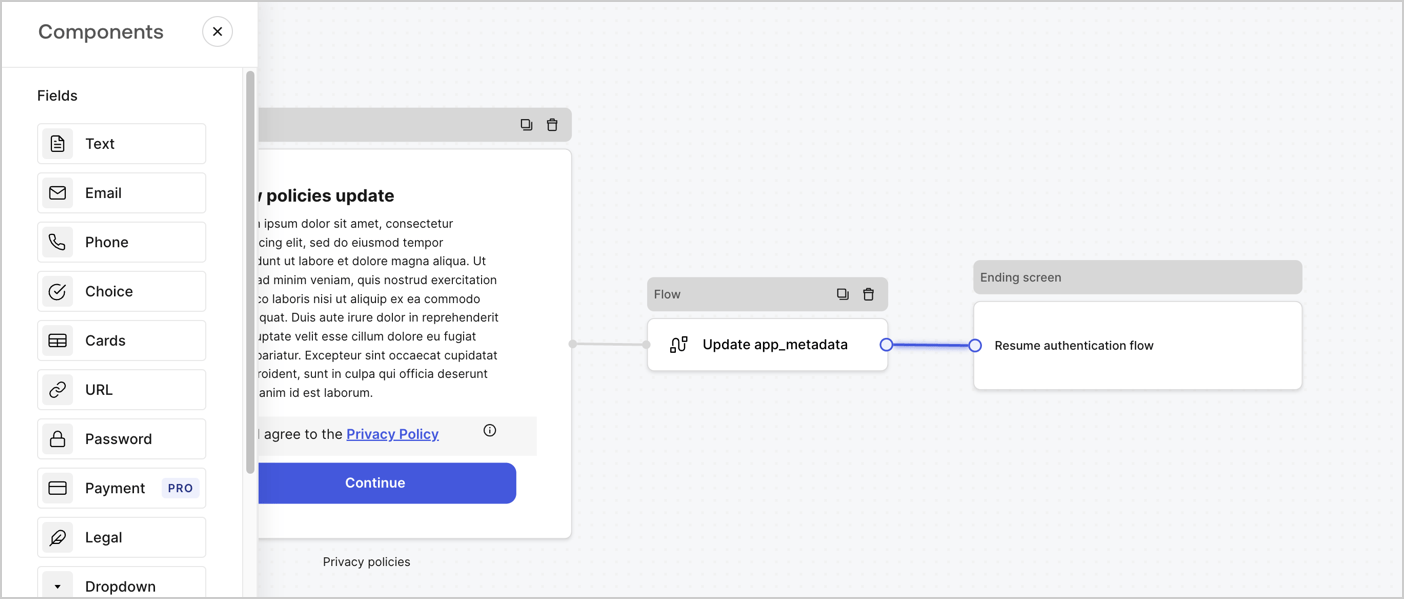
Add a **Flow** node after the **Step** node to update the `app_metadata` and resume the authentication flow by following these steps:

1. Select **Flow** from the bottom of the Form editor.
2. Remove the existing link between the **Step** and **Ending Screen** nodes.
3. Select the new **Flow** > **Click to add a flow** > **Create a new flow.**

   * Enter `Update app_metadata` in the **Name** field.
   * Select **Create**.
   * Select **Save**.
4. Link the **Flow** node to the **Step** and **Ending Screen** nodes as pictured below.
5. Select **Publish** to save.
<Frame>
  <img src="https://mintcdn.com/docs-dev-update-anonymous-sessons-ea/G1d5Sm0ol-yfoOMd/docs/images/cdy7uua7fh8z/6YIkzm7SrpM9LW76AXuRzh/353c518fe82bbaa440836da1d83596d6/link-policies.png?fit=max&auto=format&n=G1d5Sm0ol-yfoOMd&q=85&s=dc7e79c8873497cb56645308afeb5b8a" alt="Dashboard > Actions > Forms > Form" data-og-width="1404" width="1404" data-og-height="599" height="599" data-path="docs/images/cdy7uua7fh8z/6YIkzm7SrpM9LW76AXuRzh/353c518fe82bbaa440836da1d83596d6/link-policies.png" data-optimize="true" data-opv="3" srcset="https://mintcdn.com/docs-dev-update-anonymous-sessons-ea/G1d5Sm0ol-yfoOMd/docs/images/cdy7uua7fh8z/6YIkzm7SrpM9LW76AXuRzh/353c518fe82bbaa440836da1d83596d6/link-policies.png?w=280&fit=max&auto=format&n=G1d5Sm0ol-yfoOMd&q=85&s=b7515dec4c929c7b2dd31f4fdeb53a68 280w, https://mintcdn.com/docs-dev-update-anonymous-sessons-ea/G1d5Sm0ol-yfoOMd/docs/images/cdy7uua7fh8z/6YIkzm7SrpM9LW76AXuRzh/353c518fe82bbaa440836da1d83596d6/link-policies.png?w=560&fit=max&auto=format&n=G1d5Sm0ol-yfoOMd&q=85&s=95d34df095f1aa168bd1eb32fde55419 560w, https://mintcdn.com/docs-dev-update-anonymous-sessons-ea/G1d5Sm0ol-yfoOMd/docs/images/cdy7uua7fh8z/6YIkzm7SrpM9LW76AXuRzh/353c518fe82bbaa440836da1d83596d6/link-policies.png?w=840&fit=max&auto=format&n=G1d5Sm0ol-yfoOMd&q=85&s=b471b4510ee37d3ad68a92cf89a9dded 840w, https://mintcdn.com/docs-dev-update-anonymous-sessons-ea/G1d5Sm0ol-yfoOMd/docs/images/cdy7uua7fh8z/6YIkzm7SrpM9LW76AXuRzh/353c518fe82bbaa440836da1d83596d6/link-policies.png?w=1100&fit=max&auto=format&n=G1d5Sm0ol-yfoOMd&q=85&s=f2f9acaabd5d2294d1c7b509f2a14882 1100w, https://mintcdn.com/docs-dev-update-anonymous-sessons-ea/G1d5Sm0ol-yfoOMd/docs/images/cdy7uua7fh8z/6YIkzm7SrpM9LW76AXuRzh/353c518fe82bbaa440836da1d83596d6/link-policies.png?w=1650&fit=max&auto=format&n=G1d5Sm0ol-yfoOMd&q=85&s=91815dcda7eb354e84475dc644ee2b46 1650w, https://mintcdn.com/docs-dev-update-anonymous-sessons-ea/G1d5Sm0ol-yfoOMd/docs/images/cdy7uua7fh8z/6YIkzm7SrpM9LW76AXuRzh/353c518fe82bbaa440836da1d83596d6/link-policies.png?w=2500&fit=max&auto=format&n=G1d5Sm0ol-yfoOMd&q=85&s=b9253dc537e8ae06b4dd1884c5ae9f91 2500w" />
</Frame>

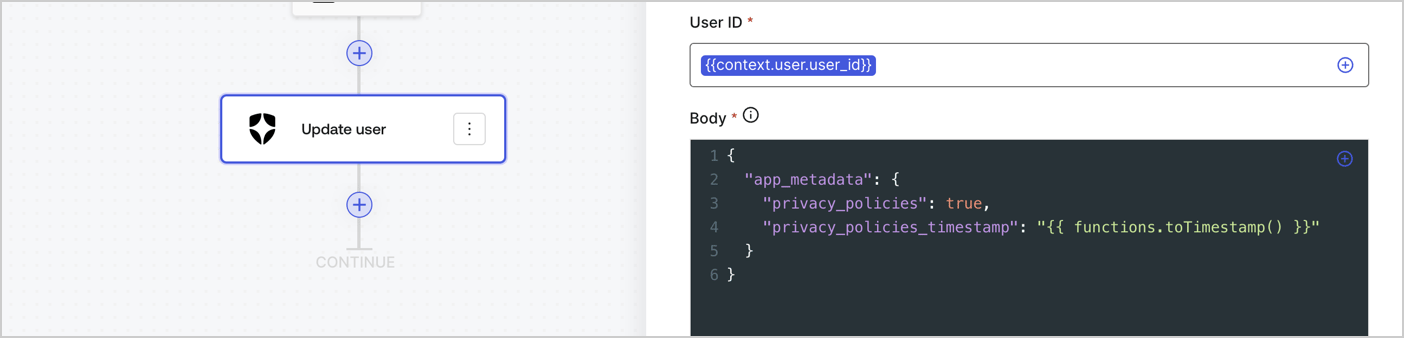
Add an Auth0 Update user action to the flow by following these steps:

1. Select the **Flow** **Update app\_metadata** > **Edit flow** to open the Flow editor in a new tab.
2. Below the StartAction, select the **+** icon to add an **Update user** action. Complete the fields below, then select **Save** to continue.

   * **Connection**: Select from the dropdown the Vault connection to your M2M application.

   * **User ID**: Enter `{{context.user.user_id}}`.

   * **Body**: Copy and paste the following code to update the app\_metadata with the privacy\_policies and privacy\_policies\_timestamp properties.

     ```text lines theme={null}
     {
       "app_metadata": {
         "privacy_policies": true,
         "privacy_policies_timestamp": "{{ functions.toTimestamp() }}"
       }
     }
     ```

   * Select **Save**.
3. Select **Publish** to save.
<Frame>
  <img src="https://mintcdn.com/docs-dev-update-anonymous-sessons-ea/LyibVdT2YlcRf01X/docs/images/cdy7uua7fh8z/CvMNIwWrOUwaFW4X3G28p/1fb70ae57a20749d9ffaaba8dc0b7e26/update-user-privacy.png?fit=max&auto=format&n=LyibVdT2YlcRf01X&q=85&s=c00881380403e42b4c1cc3d7b1aa3fb9" alt="Dashboard > Actions > Forms > User case privacy policy code" data-og-width="1404" width="1404" data-og-height="338" height="338" data-path="docs/images/cdy7uua7fh8z/CvMNIwWrOUwaFW4X3G28p/1fb70ae57a20749d9ffaaba8dc0b7e26/update-user-privacy.png" data-optimize="true" data-opv="3" srcset="https://mintcdn.com/docs-dev-update-anonymous-sessons-ea/LyibVdT2YlcRf01X/docs/images/cdy7uua7fh8z/CvMNIwWrOUwaFW4X3G28p/1fb70ae57a20749d9ffaaba8dc0b7e26/update-user-privacy.png?w=280&fit=max&auto=format&n=LyibVdT2YlcRf01X&q=85&s=0f0fbbcf4f5a8083686de1a9b18c3b25 280w, https://mintcdn.com/docs-dev-update-anonymous-sessons-ea/LyibVdT2YlcRf01X/docs/images/cdy7uua7fh8z/CvMNIwWrOUwaFW4X3G28p/1fb70ae57a20749d9ffaaba8dc0b7e26/update-user-privacy.png?w=560&fit=max&auto=format&n=LyibVdT2YlcRf01X&q=85&s=79b7973d107d106c484d8defc9d1575c 560w, https://mintcdn.com/docs-dev-update-anonymous-sessons-ea/LyibVdT2YlcRf01X/docs/images/cdy7uua7fh8z/CvMNIwWrOUwaFW4X3G28p/1fb70ae57a20749d9ffaaba8dc0b7e26/update-user-privacy.png?w=840&fit=max&auto=format&n=LyibVdT2YlcRf01X&q=85&s=52fdfc4e93f41fe75209d353b99650a3 840w, https://mintcdn.com/docs-dev-update-anonymous-sessons-ea/LyibVdT2YlcRf01X/docs/images/cdy7uua7fh8z/CvMNIwWrOUwaFW4X3G28p/1fb70ae57a20749d9ffaaba8dc0b7e26/update-user-privacy.png?w=1100&fit=max&auto=format&n=LyibVdT2YlcRf01X&q=85&s=f590b35b3e47779377a2a6333ffa7fda 1100w, https://mintcdn.com/docs-dev-update-anonymous-sessons-ea/LyibVdT2YlcRf01X/docs/images/cdy7uua7fh8z/CvMNIwWrOUwaFW4X3G28p/1fb70ae57a20749d9ffaaba8dc0b7e26/update-user-privacy.png?w=1650&fit=max&auto=format&n=LyibVdT2YlcRf01X&q=85&s=de220d64ee19dfb2cc3f82586030e764 1650w, https://mintcdn.com/docs-dev-update-anonymous-sessons-ea/LyibVdT2YlcRf01X/docs/images/cdy7uua7fh8z/CvMNIwWrOUwaFW4X3G28p/1fb70ae57a20749d9ffaaba8dc0b7e26/update-user-privacy.png?w=2500&fit=max&auto=format&n=LyibVdT2YlcRf01X&q=85&s=bb6df91fa4175f07fa9dce19e781fedd 2500w" />
</Frame>

<Callout icon="file-lines" color="#0EA5E9" iconType="regular">
  The flow **Update app\_metadata** adds a `privacy_policies true` value to the app`_metadata` object and also generates a timestamp with a [helper function.](/docs/customize/forms/variables)
</Callout>

## Retrieve the form render code

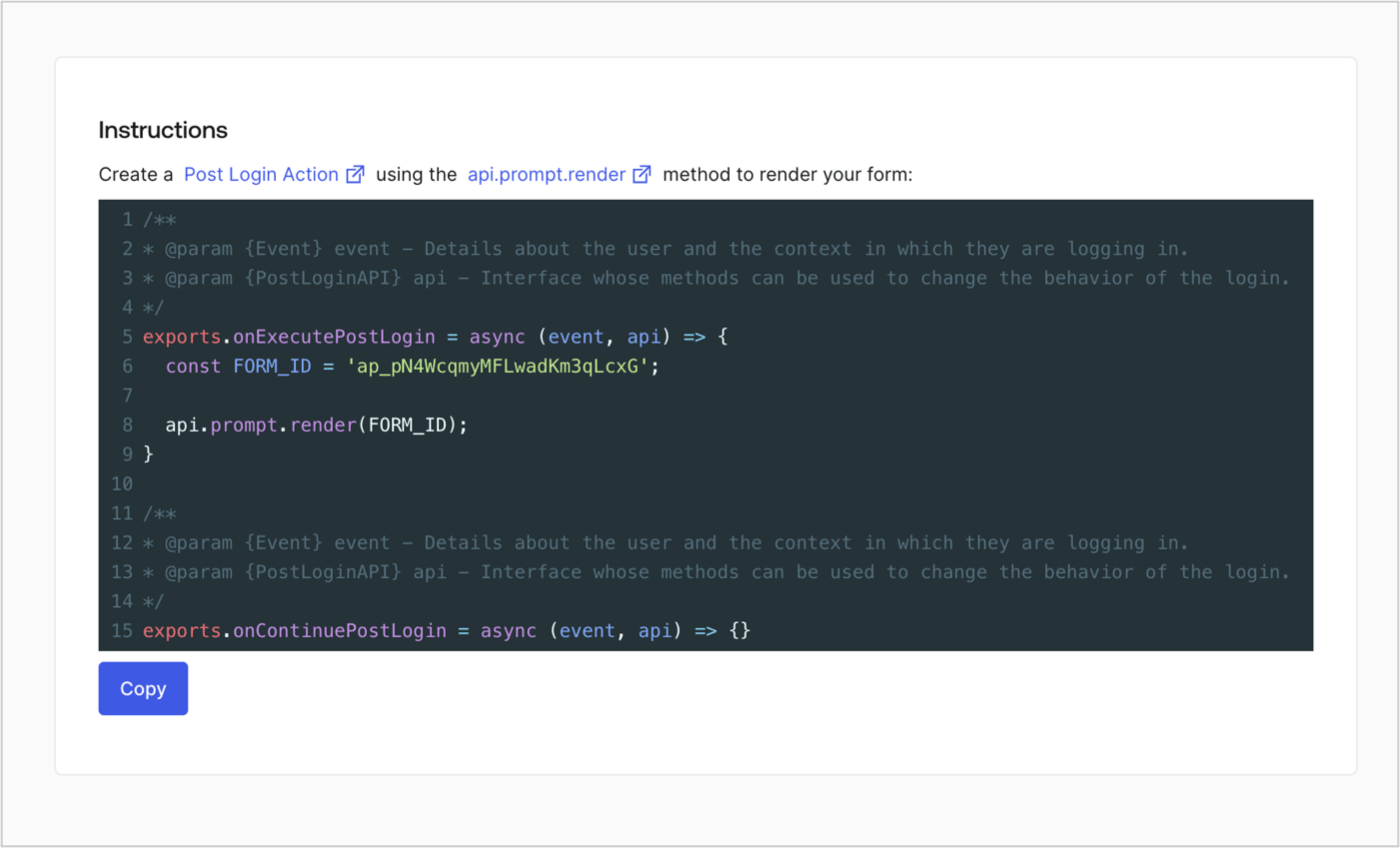
Retrieve your form render code to visually render the form with a custom Post Login Action by following these steps:

* From the Form editor, select **`<> Render`**.
* Select **Copy**.
<Frame>
  <img src="https://mintcdn.com/docs-dev-update-anonymous-sessons-ea/itgJjKWPZWQ8PNK-/docs/images/cdy7uua7fh8z/2EIUzc539sq9lwoTKbjoJv/496a864c0fc44a782c9cadca119dbfb0/embed.png?fit=max&auto=format&n=itgJjKWPZWQ8PNK-&q=85&s=439a20b83a2a20fc70a456aa45be0c21" alt="Dashboard > Actions > Forms > Form > Embed" data-og-width="1400" width="1400" data-og-height="848" height="848" data-path="docs/images/cdy7uua7fh8z/2EIUzc539sq9lwoTKbjoJv/496a864c0fc44a782c9cadca119dbfb0/embed.png" data-optimize="true" data-opv="3" srcset="https://mintcdn.com/docs-dev-update-anonymous-sessons-ea/itgJjKWPZWQ8PNK-/docs/images/cdy7uua7fh8z/2EIUzc539sq9lwoTKbjoJv/496a864c0fc44a782c9cadca119dbfb0/embed.png?w=280&fit=max&auto=format&n=itgJjKWPZWQ8PNK-&q=85&s=50e74caebda5f9465e1cb4289421f0b9 280w, https://mintcdn.com/docs-dev-update-anonymous-sessons-ea/itgJjKWPZWQ8PNK-/docs/images/cdy7uua7fh8z/2EIUzc539sq9lwoTKbjoJv/496a864c0fc44a782c9cadca119dbfb0/embed.png?w=560&fit=max&auto=format&n=itgJjKWPZWQ8PNK-&q=85&s=301385866821a11a2b1b1970ea1bbac1 560w, https://mintcdn.com/docs-dev-update-anonymous-sessons-ea/itgJjKWPZWQ8PNK-/docs/images/cdy7uua7fh8z/2EIUzc539sq9lwoTKbjoJv/496a864c0fc44a782c9cadca119dbfb0/embed.png?w=840&fit=max&auto=format&n=itgJjKWPZWQ8PNK-&q=85&s=a430ab1bff434ee8103d04ba0d1f9495 840w, https://mintcdn.com/docs-dev-update-anonymous-sessons-ea/itgJjKWPZWQ8PNK-/docs/images/cdy7uua7fh8z/2EIUzc539sq9lwoTKbjoJv/496a864c0fc44a782c9cadca119dbfb0/embed.png?w=1100&fit=max&auto=format&n=itgJjKWPZWQ8PNK-&q=85&s=a0551b156ad62f3937117d9bf62f4727 1100w, https://mintcdn.com/docs-dev-update-anonymous-sessons-ea/itgJjKWPZWQ8PNK-/docs/images/cdy7uua7fh8z/2EIUzc539sq9lwoTKbjoJv/496a864c0fc44a782c9cadca119dbfb0/embed.png?w=1650&fit=max&auto=format&n=itgJjKWPZWQ8PNK-&q=85&s=172ebf2798174dc4b166adba5c24fa0a 1650w, https://mintcdn.com/docs-dev-update-anonymous-sessons-ea/itgJjKWPZWQ8PNK-/docs/images/cdy7uua7fh8z/2EIUzc539sq9lwoTKbjoJv/496a864c0fc44a782c9cadca119dbfb0/embed.png?w=2500&fit=max&auto=format&n=itgJjKWPZWQ8PNK-&q=85&s=d8ede996b0542ba2cb53b71556930678 2500w" />
</Frame>

## Create a Post Login Action

Create a post-login Action to render your form by following these steps:

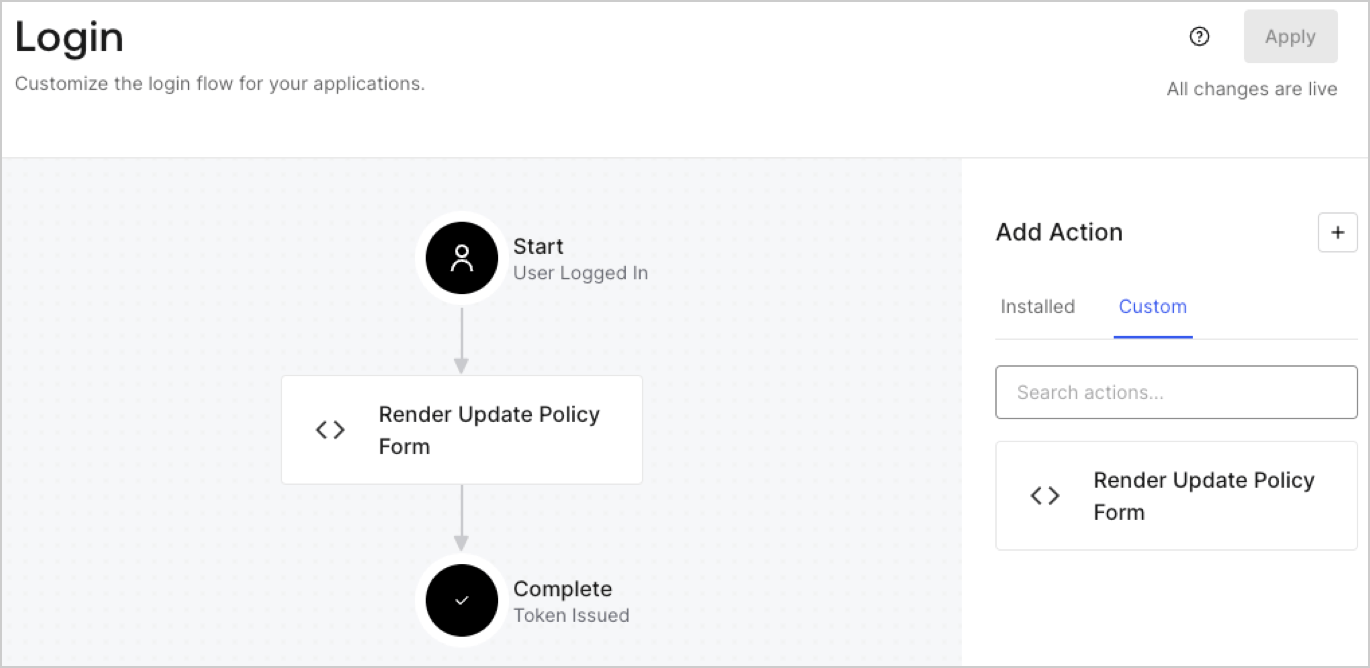
1. Navigate to **Auth0 Dashboard > Actions > Flows > Login.**
2. Select the **+** icon and Select **Build from scratch**:

   * **Name**: Enter `Render Update Policy Form`.
   * **Trigger**: Select `Login / Post Login`.
   * **Runtime**: Select the recommended version.
3. Select **Create**.

To configure the post-login Action:

1. Delete the existing code from the Code editor.
2. Paste the form render code into the Code editor.
3. Edit the code to define the conditional logic that will render the form.

   ```javascript lines theme={null}
   /**
   * @param {Event} event - Details about the user and the context in which they are logging in.
   * @param {PostLoginAPI} api - Interface whose methods can be used to change the behavior of the login.
   */
   exports.onExecutePostLogin = async (event, api) => {
     const FORM_ID = 'REPLACE_WITH_YOUR_FORM_ID';

     if (event.user.app_metadata.privacy_policies !== true) {
       api.prompt.render(FORM_ID);
     }
   }

   exports.onContinuePostLogin = async (event, api) => { }
   ```

   <Callout icon="file-lines" color="#0EA5E9" iconType="regular">
     The example code above will render the form when a user is missing the app metadata `privacy_policies` property.
   </Callout>
4. Select **Deploy.**
5. Drag and Drop the **Render Update Policy Form** Action to the **Login** flow.
   <Frame>
     <img src="https://mintcdn.com/docs-dev-update-anonymous-sessons-ea/gaGY78MREKo0SjhU/docs/images/cdy7uua7fh8z/5TOwDgevZsBqd7yZynUYWU/41ca909dc3007aed4f40ff794a05efa5/postlogin.png?fit=max&auto=format&n=gaGY78MREKo0SjhU&q=85&s=b08a4ecd5810d76cbb478f74ae6be3e5" alt="Dashboard > Forms > Use Case > Render update policy form login action" data-og-width="1370" width="1370" data-og-height="668" height="668" data-path="docs/images/cdy7uua7fh8z/5TOwDgevZsBqd7yZynUYWU/41ca909dc3007aed4f40ff794a05efa5/postlogin.png" data-optimize="true" data-opv="3" srcset="https://mintcdn.com/docs-dev-update-anonymous-sessons-ea/gaGY78MREKo0SjhU/docs/images/cdy7uua7fh8z/5TOwDgevZsBqd7yZynUYWU/41ca909dc3007aed4f40ff794a05efa5/postlogin.png?w=280&fit=max&auto=format&n=gaGY78MREKo0SjhU&q=85&s=3c23f5817b27949b94546d91b9503a63 280w, https://mintcdn.com/docs-dev-update-anonymous-sessons-ea/gaGY78MREKo0SjhU/docs/images/cdy7uua7fh8z/5TOwDgevZsBqd7yZynUYWU/41ca909dc3007aed4f40ff794a05efa5/postlogin.png?w=560&fit=max&auto=format&n=gaGY78MREKo0SjhU&q=85&s=81bcad7ebc15059fa617a6ad225d84e6 560w, https://mintcdn.com/docs-dev-update-anonymous-sessons-ea/gaGY78MREKo0SjhU/docs/images/cdy7uua7fh8z/5TOwDgevZsBqd7yZynUYWU/41ca909dc3007aed4f40ff794a05efa5/postlogin.png?w=840&fit=max&auto=format&n=gaGY78MREKo0SjhU&q=85&s=1c6640ff9e23c7453f18b5ebb4abb592 840w, https://mintcdn.com/docs-dev-update-anonymous-sessons-ea/gaGY78MREKo0SjhU/docs/images/cdy7uua7fh8z/5TOwDgevZsBqd7yZynUYWU/41ca909dc3007aed4f40ff794a05efa5/postlogin.png?w=1100&fit=max&auto=format&n=gaGY78MREKo0SjhU&q=85&s=181381aa1228bd9cd93cf665af4332ab 1100w, https://mintcdn.com/docs-dev-update-anonymous-sessons-ea/gaGY78MREKo0SjhU/docs/images/cdy7uua7fh8z/5TOwDgevZsBqd7yZynUYWU/41ca909dc3007aed4f40ff794a05efa5/postlogin.png?w=1650&fit=max&auto=format&n=gaGY78MREKo0SjhU&q=85&s=a9977ec3ab7f83dfcab9578ce0431fd6 1650w, https://mintcdn.com/docs-dev-update-anonymous-sessons-ea/gaGY78MREKo0SjhU/docs/images/cdy7uua7fh8z/5TOwDgevZsBqd7yZynUYWU/41ca909dc3007aed4f40ff794a05efa5/postlogin.png?w=2500&fit=max&auto=format&n=gaGY78MREKo0SjhU&q=85&s=5f8c27a73d8b5b9c76bb6e4a6326120a 2500w" />
   </Frame>
6. Select **Apply.**

### Test implementation

Test the implementation by following these steps:

1. Log in with an existing user whose app`_metadata` attribute `privacy_policies` does not have a value.
2. The post-login Action in the Login flow will render the form and prompt for acceptance.
3. Select **Auth0 Dashboard > User Management > Users,** locate the user and verify that the `app_metadata` attribute `privacy_policies` contains a `true` value and a timestamp.
